Barcodes for products are scannable images of a number, usually a GTIN (Global Trade Item Number), that identifies one specific version of a product: this size, this colour, this pack. The barcode carries the number, not the price or description. Retailers, marketplaces and warehouses scan it and look the product up in their own systems.
POV: the packaging design is almost final and the designer asks, "where's the barcode going?" You grab a free generator, make up a number, and call it done, based on vibes. Plot twist: a made-up or second-hand number can belong to someone else's company, and the problem shows up after thousands of boxes are printed.
This guide explains what the codes mean, which sales channels need them, how to get GS1 barcodes, and what to tell your factory so the barcode on the box actually scans.
This is what we do at My Selection: we help creators develop products and work with factories, including the packaging and the details printed on it. If you're getting ready for a first run, tell us what you're making.
What a product barcode is made of
Three terms get used as if they mean the same thing. They don't:
| Term | What it is |
|---|---|
| GTIN | The number itself: a Global Trade Item Number that identifies one trade item. It's issued within the GS1 system. |
| UPC / EAN | Barcode formats that carry a GTIN. A UPC-A barcode carries a 12-digit GTIN (GTIN-12); an EAN-13 barcode carries a 13-digit GTIN (GTIN-13). |
| SKU | Your own internal stock code. Useful in your store and spreadsheets, but not unique outside your business. |
A few other details worth knowing:
- GTINs come in four lengths: GTIN-8 for very small items, GTIN-12 and GTIN-13 for most consumer products, and GTIN-14 for cartons and cases of a product.
- The first digits are a company prefix. When you join GS1, your local GS1 office assigns your business a GS1 company prefix (or, at some offices, individual GTINs), and the GTINs you create start with it. That's what ties the number to your brand.
- The last digit is a check digit, calculated from the others so scanners can catch misreads.
- There's no price in it. According to GS1's barcode FAQ, the barcode generally just represents the number; description and price sit in the retailer's database.
Which barcodes for products you need, by sales channel
Whether you need barcodes at all depends on where you sell. Here's the decision in one table:
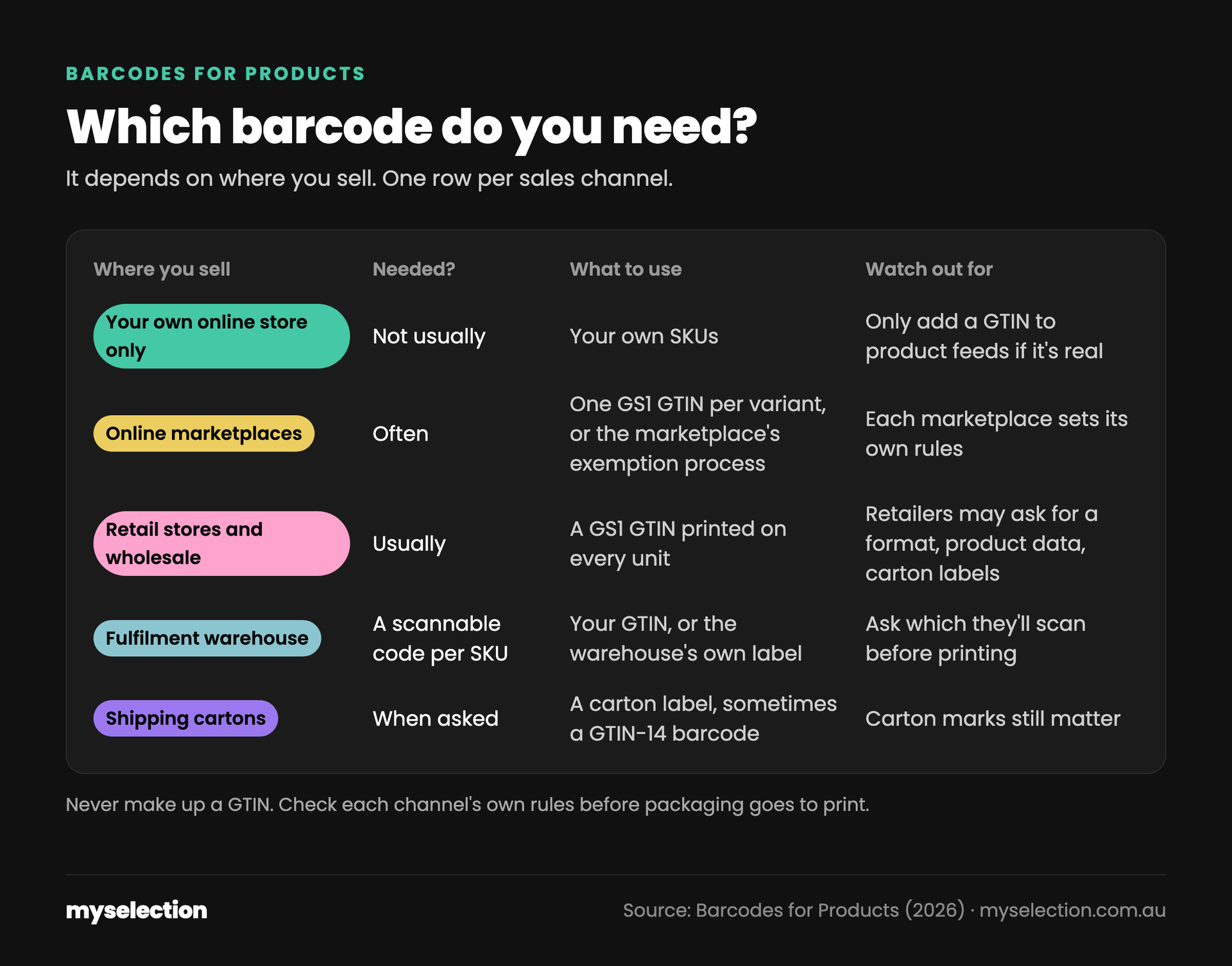
Which barcode you need, by where you sell. Free to share with a link back to this guide.
| Where you sell | Barcode needed? | What to use | Watch out for |
|---|---|---|---|
| Your own online store only | Not usually | Your own SKUs | If you send product feeds to shopping ads or listings, only add a GTIN if it's real |
| Online marketplaces | Often | One GS1 GTIN per variant, or the marketplace's exemption process where one exists | Each marketplace sets its own rules; read them before you print |
| Retail stores and wholesale | Usually | A GS1 GTIN printed on every unit | Retailers may ask for a specific format, product data and carton labels |
| Fulfilment warehouse (3PL) | Usually a scannable code per SKU | Your GTIN, or the warehouse's own label | Ask which they'll scan before packaging goes to print |
| Shipping cartons | When a retailer or warehouse asks | A carton label, sometimes a GTIN-14 barcode | Carton marks (quantity, contents, size) still matter |
On the first row: Google's Merchant Center guidance on GTINs says some products don't have a GTIN and don't need to submit one, and that you should only provide a GTIN if you're sure it's correct, never a guessed or made-up value.
If there's any chance you'll move from your own store to marketplaces or retail within the next year, it's usually easier to get proper GTINs now than to reprint packaging later.
One GTIN per variant
Every version a customer could buy separately needs its own GTIN: each size, each colour, each scent, and each pack quantity (a single and a three-pack are different items). GS1's GTIN standard is built on that idea: one number, one trade item.
So before you count how many codes you need, list your variants. A hoodie in 3 colours and 5 sizes isn't one product for barcode purposes. It's 15.
Keep a simple master list: GTIN, product name, variant, SKU, and where the barcode appears. The factory, your warehouse and every sales channel will ask for some version of it.
How to get GS1 barcodes
GS1 says it is the only official provider of GS1 GTINs and EAN/UPC barcodes. Its Get barcodes page lays out three steps, and we've added the ones that happen around them:
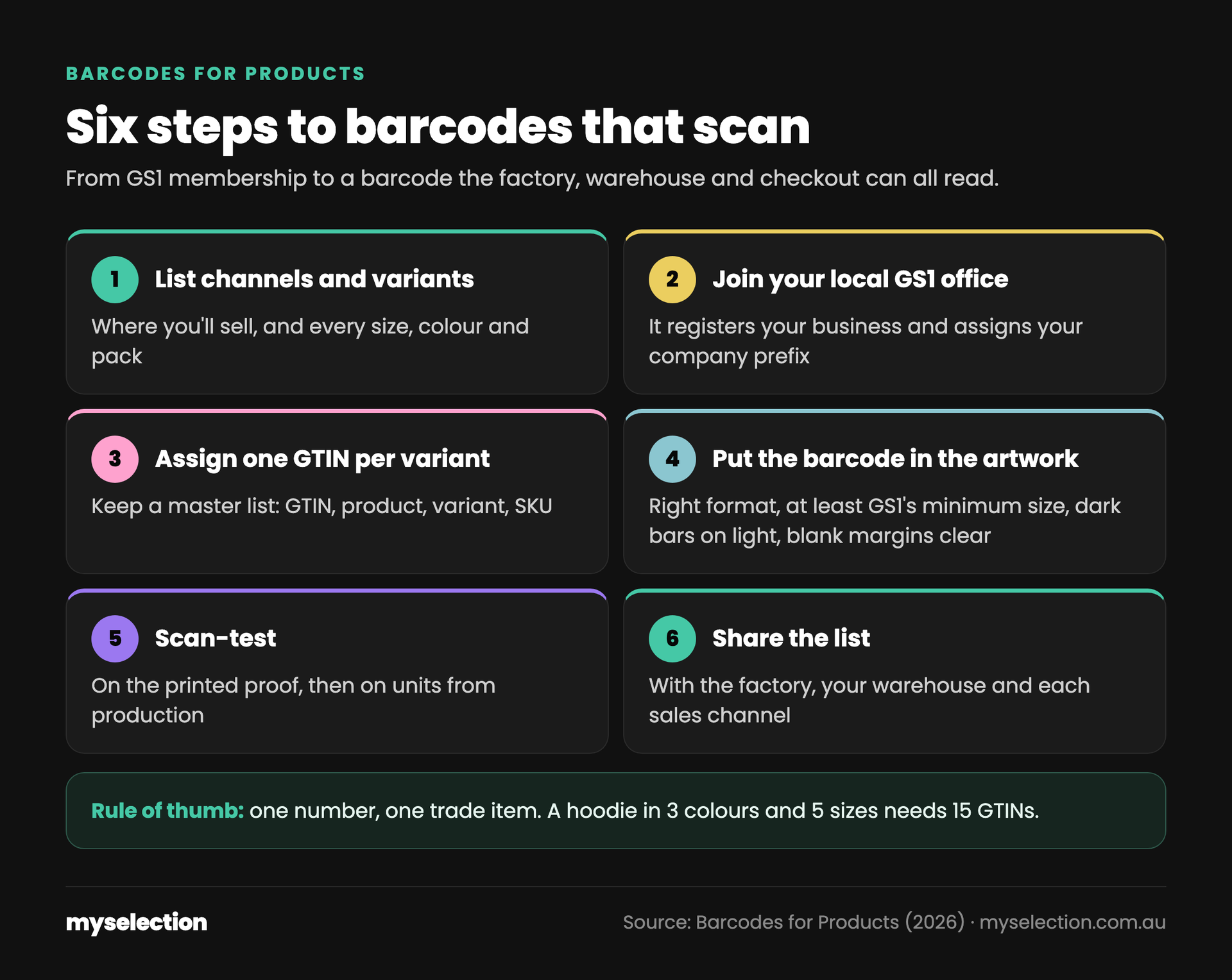
Six steps from GS1 membership to a barcode that scans. Free to share with a link back to this guide.
- List your channels and variants. Decide where you'll sell in the next year and count every variant. That tells you whether you need GTINs and roughly how many.
- Join your local GS1 office. GS1 works through local member organisations in over 120 countries. Your local office registers your business and assigns your company prefix. Fees and the number of GTINs included depend on the office and the plan, so check its current options.
- Assign one GTIN per variant using the tool your GS1 office provides, and record each one on your master list. Don't reuse a number for a different product later.
- Put the barcode into the packaging artwork. GS1's FAQ lists three ways to apply a barcode: build it into the packaging artwork, use pre-printed labels, or print it on the packaging on site. For printed packaging, the artwork route is the cleanest. Use the format your channels expect, keep it at or above GS1's minimum size, use dark bars on a light background, and leave the blank margins on either side clear.
- Scan-test it. Scan the barcode on the printed proof before approving it, and again on units from production. A barcode that looks fine can still fail if it's shrunk, cropped or printed in low contrast.
- Share the list with your factory, your warehouse and each sales channel, so the same number means the same product everywhere.
Barcodes are one line on a longer pre-launch list. Our product launch checklist shows where they fit alongside samples, inspection, fulfilment and your product page.
Common mistakes
Buying cheap codes from a reseller. Numbers sold outside GS1 typically start with a company prefix licensed to someone else, so a lookup won't connect them to your brand. Retailers and marketplaces that check where a GTIN comes from can reject them.
Making up a number. A number that happens to pass the check digit can still belong to another company's product. Never invent GTINs, for packaging or for product feeds.
One barcode for every size. If a small and a large share a barcode, every scan at a warehouse or till records the wrong item.
Placing the barcode last. If the barcode is squeezed onto a curved edge, over a seam or across a fold at the end of the design process, it may not scan. Decide its spot early, when you plan your packaging.
Assuming a QR code replaces it. A QR code linking to your website is great for marketing, but it isn't a substitute for the product's GTIN barcode unless the retailer or channel tells you otherwise.
Vague vs factory-ready barcode instructions
| Vague | Factory-ready |
|---|---|
| "Add a barcode" | "EAN-13 barcode, GTIN as per the attached list, one per colour and size" |
| "Put it on the back" | "Back panel, bottom right, on a flat surface, not across a fold or seam" |
| "Make it small" | "At or above GS1's minimum size; no cropping or shortening the bars" |
| "Any colour is fine" | "Black bars on a white background; blank margins on both sides kept clear" |
| "Check it works" | "Scan-test the printed proof; scan a sample of units at inspection" |
Conclusion
Barcodes for products come down to three decisions: do your sales channels need GTINs, how many variants do you have, and where on the packaging will the barcode go. If you're selling only through your own store, you may not need them yet. If marketplaces or retail are in the plan, get GS1 GTINs before packaging goes to print, give every variant its own number, and scan-test before you approve.
FAQ
Do I need a barcode to sell online? Not always. Your own online store can run on your own SKUs, and Google says some products don't have a GTIN and don't need one. Many marketplaces, retailers and fulfilment warehouses do ask for a barcode, so check each channel you plan to use before packaging is printed.
What's the difference between UPC and EAN? They're two barcode formats from the same GS1 system. A UPC-A barcode carries a 12-digit GTIN, and an EAN-13 barcode carries a 13-digit GTIN. Which one to print depends on what your retailers and channels expect, so ask them before you assign codes.
How many barcodes do I need? One per variant that's sold on its own: every size, colour and pack quantity. Count your variants, add the ones you expect to launch soon, and choose a GS1 plan that covers that number. Running short later just means adding codes, but each new variant still needs its own.
Can I use the factory's barcode? Only if the product is sold under the factory's brand. For your own brand, the GTIN should come from your own GS1 licence, so the number points to your business, not the factory's. Give the factory your barcode list and artwork instead.
Discuss your product idea
Getting packaging, labels and barcodes ready for a first run? Discuss your product idea with us. My Selection supports creator product development, working with long-term partner factories in Jiangsu, Zhejiang and the Pearl River Delta and our own development team in China. Our supplier network covers 867 suppliers across 34 countries, with 10+ designers on the team. Which products fit and what's included are confirmed per project. Lead times, MOQs and unit costs depend on the product, so we confirm those too.